TL;DR: Most abandoned checkouts are not customers changing their mind.
They happen because something stops the customer during checkout — cost surprises, payment problems, slow mobile pages, or even bots. The shopper wanted to buy but hit unwanted friction and left.
First : This Is Usually Normal
If you open Shopify and suddenly see a long list of abandoned checkouts, it can feel scary. Many store owners immediately assume:
- something is broken
- customers don’t trust the store
- payments are failing
- traffic is bad quality
- bots are attacking
In most cases, none of those are true.
An abandoned checkout simply means:
A shopper started checkout, entered their email address, but did not finish paying.
That detail is very important.
Shopify does not mark a checkout as abandoned just because someone added a product to their cart. (If you’re new to this concept, start with what an abandoned cart actually means in Shopify — it explains the cart vs. checkout distinction in detail.)
They must actually begin the checkout process.
So abandoned checkouts are not just a problem.
They are also proof of something good:
People were interested enough to try to buy.
Why Shopify Shows So Many Abandoned Checkouts
Online shopping does not work like a physical store.
In a physical store:
People browse → decide → then go to the register.
In ecommerce:
People often use the checkout page while they are still deciding.
Many shoppers go to checkout specifically to:
- see shipping costs
- see taxes
- check the final total price
- estimate delivery time
- try discount codes
They are not committing to buy yet.
They are calculating.
Your checkout page is acting like a price calculator.
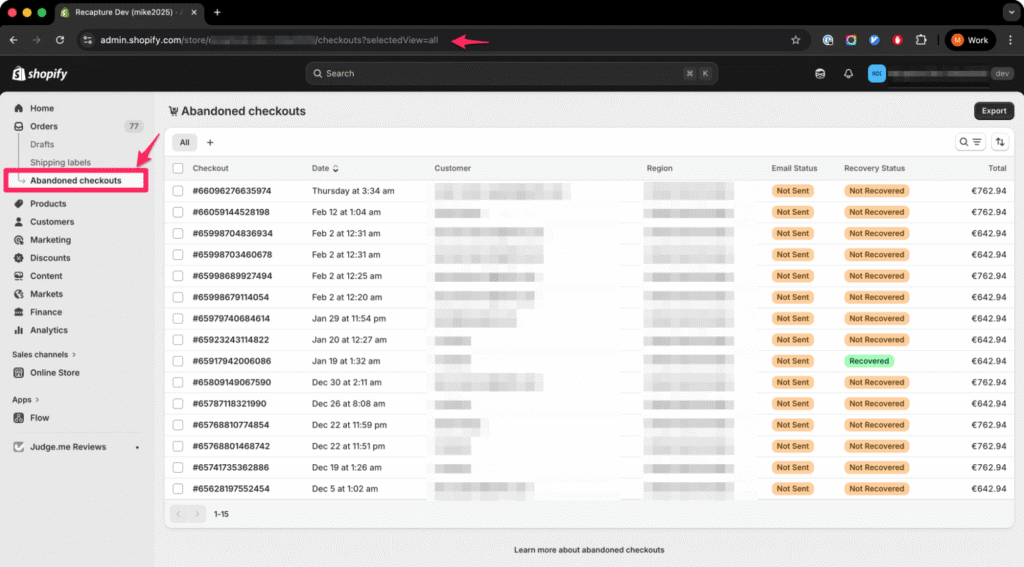
This is the biggest reason merchants suddenly notice a large number of abandoned checkouts, like this:
The Most Common Causes (and What They Really Mean)
Using the checkout details view (here’s where to find your abandoned checkouts in Shopify if you haven’t located them yet), like this:
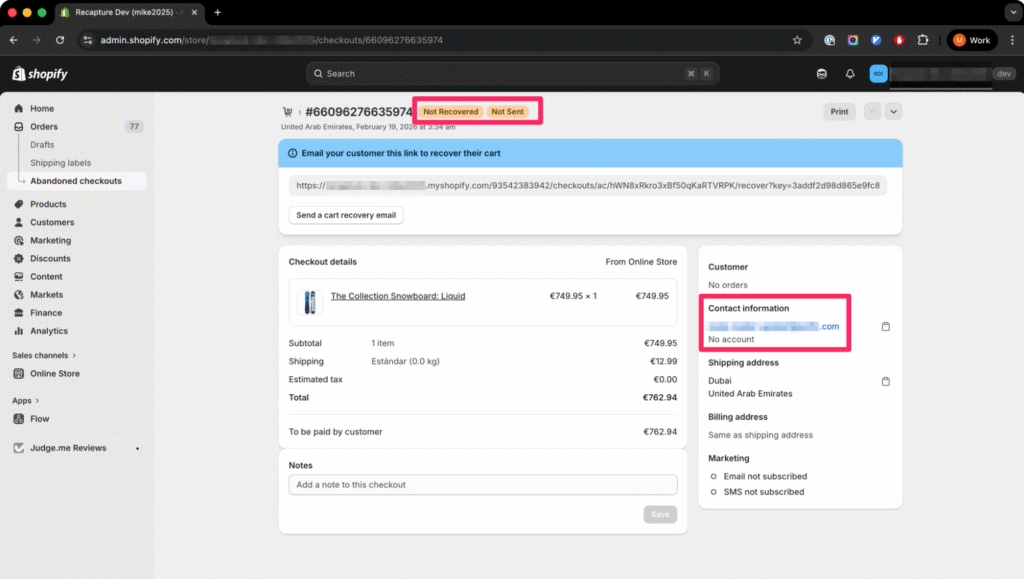
You can discover a lot about WHY they left.
1) Shipping Cost Discovery
This is the #1 reason across Shopify stores.
Customers cannot see the full price until they reach checkout. Your customers add to cart, and then enter checkout to learn the real total.
If they leave after entering their address, it does not mean they rejected your store.
It means they were comparing prices.
Typical signal: Address entered, but no payment attempt.
This is worth quantifying. Industry data consistently shows shipping cost surprises as the top reason for checkout abandonment across all ecommerce platforms, not just Shopify. The problem is structural: Shopify’s default checkout flow can’t display shipping costs until the customer enters an address, so there’s an unavoidable moment where the total jumps. Some stores mitigate this by showing a shipping estimate on the product page or cart page, using a shipping calculator widget, or offering free shipping thresholds. If your abandoned checkout data shows a large number of records with an address entered but no payment attempt, shipping presentation is where to focus first — not discounts, not marketing, and not recovery emails.
2) Payment Hesitation (Very Important)
Many shoppers reach the payment screen and then stop.
This is not always about price.
It is usually about trust.
At this moment, customers are thinking:
- Is this store real?
- Will I actually get the product?
- What if I need a return?
Online purchases feel risky, and checkout is where that risk becomes real.
Typical signal: All details entered, but payment not submitted.
Trust signals matter more here than anywhere else in the buying journey. At the moment a customer is staring at a payment form, they’re running a mental risk calculation — and on a store they’ve never bought from before, the default answer is often “not yet.” Concrete fixes that reduce payment hesitation include displaying trust badges near the payment button, showing your return and refund policy prominently on the checkout page, including a customer service phone number or chat link, and using recognizable payment options like Shop Pay, PayPal, or Apple Pay that carry their own trust. The goal isn’t to eliminate hesitation (some shoppers need multiple visits before they buy). The goal is to remove unnecessary friction for the shoppers who are ready right now.
3) Mobile Checkout Friction
More than half of Shopify visitors shop on phones.
Mobile checkout often causes abandonment because:
- typing is slow
- autofill doesn’t work
- password managers interfere
- payment verification interrupts the process
These are usability problems, not product problems.
Typical signal: Many checkouts but very few completed payments, especially from mobile traffic.
4) Comparison Shopping (Extremely Common)
Many shoppers open several stores at once.
They:
- add items on multiple sites
- open checkout in each store
- compare total price
Only one store gets the order.
Your store was part of their decision process.
Typical signal: High abandonment while traffic levels look normal.
5) Coupon Hunting
Some visitors intentionally start checkout to:
- find a coupon box
- test discount codes
- wait for a recovery email with a discount
They expect an abandoned cart email.
Your checkout became a marketing trigger.
Typical signal: Email entered quickly, but no address provided.
This is a double-edged sword. On one hand, these shoppers have buying intent — they’re trying to get a better deal, not walking away from your product. On the other hand, if your recovery emails always include a discount code, you’re training customers to abandon checkout deliberately. The coupon box visible in Shopify’s checkout is a known conversion killer for stores that don’t actively run promotions, because it makes shoppers think they’re missing a deal.
Shopify’s built-in recovery email can contribute to this problem, since merchants often include discount codes as the primary incentive. Understanding what Shopify’s default checkout email sends will help you decide whether your current recovery approach is creating the behavior you’re trying to fix.
6) Payment Method Mismatch
Sometimes customers leave because they cannot pay the way they want.
Common examples:
- no Shop Pay
- no PayPal
- no local payment options
- card declined
They did not reject your product.
They rejected the available payment method.
When You Should Worry
Abandoned checkouts are normal. But these three major warning patterns are not.
Warning Pattern 1 — No Orders At All
If you have:
traffic + checkouts + zero purchases
Possible causes:
- payment gateway setup problem
- incorrect taxes or shipping rules
- checkout apps conflicting
Warning Pattern 2 — Very Large Fake Carts
Some merchants notice carts with extremely high totals. Like these merchants did on this Reddit thread.
These are often bots.
Bots may:
- add expensive items
- never purchase
- use fake emails
Reasons can include:
- testing stolen cards
- scanning inventory
- validating email systems
If totals look unrealistic, bots are likely. Google’s shopping bot can also crawl your site for info about pricing and products, and it also looks like this, too. But bad actors can do it as well.
Warning Pattern 3 — Repeated Payment Failures
If customers reach payment but keep failing, it is usually technical.
Possible causes:
- 3-D Secure failures
- fraud filters blocking buyers
- gateway restrictions
- certain cards not supported in certain regions
This is a checkout system issue, not a marketing problem.
When You Should NOT Worry
You should not worry if:
- you receive emails but no address
- checkouts match your traffic
- some customers come back later and buy
- you still have orders along with abandonments
Normal ecommerce behavior:
Most shoppers do not buy on their first visit.
Abandoned checkouts are part of the buying journey.
Why This Data Is Actually Valuable
Abandoned checkouts are not just a failure metric.
They are a buyer intent signal.
These shoppers:
- picked a product
- checked the final price
- seriously considered buying
They are closer to purchasing than almost any other visitor.
That is why recovery emails work.
You are not persuading strangers.
You are reminding people who already almost bought.
Frequently Asked Questions About Shopify Abandoned Checkout Causes
Most Shopify stores see between 60% and 80% of started checkouts go incomplete. The Baymard Institute puts the global ecommerce average at roughly 70%. If your rate falls within that range, your store is performing normally. A rate significantly above 80% may signal a specific problem like payment gateway errors, extreme shipping costs, or a broken checkout flow. A rate below 50% is unusually strong and typically means your traffic is highly targeted or you have a very loyal customer base.
Some of them might be, but not usually the majority. Bot activity is easier to identify than most people think. Look for patterns like extremely high cart values that no real customer would create, fake or obviously random email addresses, and clusters of abandoned checkouts happening at the same time. Google’s shopping bot also crawls Shopify stores to gather pricing and product data, and those visits can show up as abandoned checkouts. If you suspect bot traffic, check your checkout records for unrealistic cart totals and email addresses that look generated. Normal abandoned checkouts will have real-looking email addresses and reasonable cart values.
Be careful with this approach. Offering a discount in every recovery email trains customers to abandon checkout on purpose because they learn that leaving triggers a coupon. A better strategy is to send your first recovery email without a discount, focusing on a simple reminder with the checkout link. If the shopper does not respond, you can include a small incentive in the second or third email. Reserve your strongest discounts for high-value carts where the recovered revenue justifies the margin hit. This approach recovers more revenue overall without conditioning shoppers to expect automatic discounts.
No. Abandoned checkouts are an internal metric that has no impact on your store’s search rankings, page speed, or public reputation. Google does not see or index your abandoned checkout data. The only impact is financial: each unrecovered checkout represents potential revenue you did not capture. That said, the patterns in your abandoned checkout data can reveal real problems with your store, like high shipping costs or missing payment methods, that do indirectly affect your conversion rate and growth.
Payment-step abandonment is usually caused by trust, not price. At the moment a customer is looking at a payment form on a store they have never bought from before, they are making a risk calculation. Common reasons they stop include not seeing recognizable payment options like PayPal, Shop Pay, or Apple Pay, not finding a clear return or refund policy, seeing no trust badges or security indicators near the payment button, and not being able to find a customer service contact. Payment processing errors like declined cards or failed 3-D Secure authentication also cause abandonment at this step, but those are technical issues rather than trust issues.
Timing matters more than most store owners realize. The first recovery email should go out within one to two hours of the abandonment. At that point the shopper still remembers your store and the products they were considering. Waiting 24 hours, which is Shopify’s default delay, means competing with everything else in the customer’s inbox and memory. If you are using a multi-step recovery sequence, a common schedule is the first email at one hour, a second at 24 hours, and a third at 72 hours. For step-by-step setup instructions, see our Shopify abandoned cart recovery guide.
You cannot eliminate abandoned checkouts entirely because many of them represent normal shopping behavior like price comparison and browsing. But you can reduce unnecessary friction that causes shoppers to leave when they actually intended to buy. The most effective changes include showing shipping costs before checkout on product pages or the cart page, offering multiple payment methods, simplifying your checkout form, making your return policy easy to find, and ensuring your checkout loads quickly on mobile devices. For a complete list of proven strategies, see our guide to the best Shopify abandoned cart apps that can help automate these improvements.
The Real Question You Should Ask
The wrong question is:
“Why do I have abandoned checkouts?”
Instead, you should be asking:
“Am I converting enough of the people who already tried to buy?”
Because Shopify stores rarely lose revenue on the product page.
They lose revenue at checkout hesitation.
What to Do About It
The most important point: Abandoned checkouts usually do not mean your store is failing. They’re a normal part of how people shop online. Customers reach checkout to compare prices, check shipping, test payment options, or simply pause before deciding.
The real issue isn’t preventing abandonment entirely because that’s not realistic. The real opportunity is recovering the shoppers who already tried to buy. Some abandonment types (comparison shopping, wishlist behavior) can’t be fixed at the checkout itself. But many customers will complete their purchase if you follow up the right way and at the right time.
Here’s where to go depending on what your data is telling you:
If most abandonments happen at the shipping step: The fix is in your checkout experience, not in follow-up emails. Consider showing shipping estimates earlier, offering free shipping thresholds, or simplifying your shipping options. Then set up a recovery system to catch the shoppers you couldn’t save at checkout; our step-by-step Shopify abandoned cart recovery guide walks through the full process.
If most abandonments happen at the payment step: Trust and payment method issues are your priority. Review the fixes in Cause #2 above, and make sure you’re offering the payment methods your customers expect. Payment-step abandonment also has the highest recovery rate because these shoppers were seconds from buying; a well-timed reminder often finishes the job.
If you’re seeing a lot of “Recovery email not sent”: Shopify’s built-in email has limitations that catch many store owners off guard. It only sends one email, it skips certain cases, and you can’t customize the timing or sequence. Read our breakdown of what Shopify’s default checkout email sends and why it often falls short to see whether it’s working for your store or leaving revenue on the table.
If you want to go beyond Shopify’s built-in recovery: Third-party recovery apps can send multi-step sequences, add SMS, and personalize timing based on cart value. We tested the most popular options head to head; see our comparison of the best Shopify abandoned cart apps.
For a complete overview of recovery strategies across all platforms: → Abandoned Cart Recovery guide
Or go back to the hub: → Shopify abandoned cart guide