Shopify’s abandoned checkout email is a built-in reminder sent to customers who start checkout but do not complete payment.
It helps recover some sales.
But for most growing stores, it is not enough.
If you’re new to abandoned checkouts, start here first:
👉 Abandoned Cart Shopify – Definition, Causes & Recovery
👉 What an abandoned cart actually means in Shopify
How Shopify’s Abandoned Checkout Email Works
Shopify’s old system includes one automatic abandoned checkout email.
To enable it:
- Login to Shopify’s admin dashboard
- Go to Settings
- Click Notifications
- Find Abandoned checkout
- Enable automatic sending
Having trouble finding it? Where to find your abandoned checkouts in Shopify
Once enabled, Shopify:
- Sends one reminder email
- Includes a checkout link
- Displays cart items
- Uses fixed timing
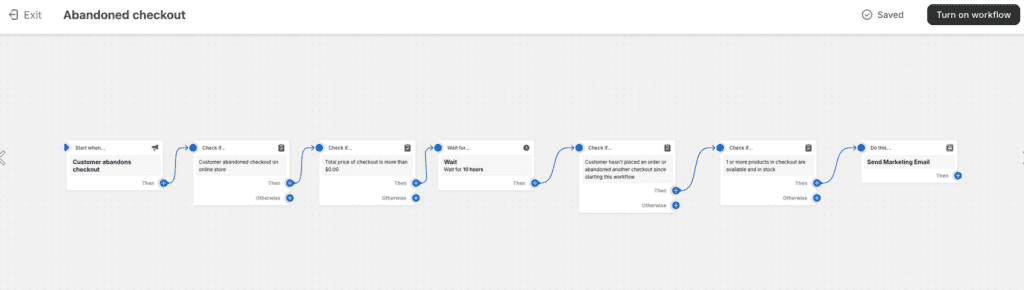
A new system is available, but it’s significantly more complex than before–you must now configure “workflows” with timing, conditions and other things to make sure your customers get their emails. Thankfully, Shopify provides a template for this called “Abandoned Checkout”, which looks like this:
What Shopify’s Email Does Well
For small or new stores, if you enable the default workflow:
- Requires no setup
- Runs automatically
- Recovers some distracted buyers
- Is included in most plans
Shopify’s email can be very simple to setup and use–and it can get complex very, very quickly in a bad way.
But simple does not mean optimized or most effective.
Why Shopify’s Abandoned Checkout Email Often Underperforms
Most stores recover only 3–8% using Shopify’s built-in email.
Here’s why.
1️⃣ Most People Send Only One Email
Many buyers need more than one reminder.
Most of your customers will:
- Miss emails
- Get distracted
- Wait to compare prices
- Need reassurance
A single email misses all of those opportunities. Read more on why customers are abandoning checkout to better understand the psychology behind it.
If you want to implement a full recovery sequence, read:
👉 Shopify Abandoned Cart Recovery: Step-by-Step System
2️⃣ No Behavioral Logic
Unless you change the defaults, Shopify will not:
- Adjust timing dynamically
- Separate payment failures from hesitation
- Send different messaging for high-value carts (with a different flow)
- Adapt based on user behavior
Every abandoned checkout is treated the same.
That limits recovery potential.
3️⃣ No Automatic Cart Value Segmentation
A $30 cart and a $600 cart are likely to receive identical messaging in a Shopify setup.
High-value carts often require:
- Faster follow-up
- Stronger trust reinforcement
- Personalized messaging
Automation platforms allow you to segment by cart value and send different sequences.
👉 See How Recapture Automates Abandoned Cart Recovery
4️⃣ Limited Performance Tracking
Shopify’s default cart recovery setup does not provide deep recovery analytics.
You cannot easily:
- Compare sequence performance
- Track revenue per email
- Optimize timing windows
- Test multi-step logic
Recovery optimization requires more data that Shopify’s system provides by default.
Recovery Rate Comparison
| System | Typical Recovery Rate |
|---|---|
| Shopify single email | 3–8% |
| Multi-step email sequence (optimized) | 10–15% |
| Email + SMS automation, combined & optimized | 15–20% |
For deeper benchmarks and what “good” really looks like:
👉 What Is a Good Shopify Abandoned Cart Recovery Rate?
When Shopify’s Built-In Email Is Enough
Shopify’s abandoned checkout workflow may be sufficient if:
- You are just launching
- Traffic is low
- Orders are inconsistent
- You want a basic reminder system
It is a starting point that works well for new stores, but it is not a growth system or one you should rely on long-term.
When You Need Advanced Recovery Automation
You likely need more than Shopify’s default email if:
- You have steady daily traffic
- You see frequent abandoned checkouts
- Your recovery rate is under 8%
- You want segmentation
- You want multi-step sequences
- You want higher recovery revenue
- You don’t want to spend all day configuring the workflows (or checking to make sure they’re “right”)
Automation allows:
- Timed sequences
- Cart value targeting
- SMS follow-ups
- Better reporting
Compare solutions based on your needs: See best Shopify abandoned cart apps
Learn how automated recovery works on other platforms in our Abandoned Cart Recovery guide.
Ready to get started?
You can have Recapture up and running in 5 minutes.
Free, 15-day, zero-risk, no-credit-card-required trial.
Simplify your abandoned cart recovery, profitably, right now!
Frequently Asked Questions About Shopify Abandoned Checkout Emails
Shopify’s abandoned checkout email is an automated reminder sent to customers who enter checkout and provide an email address but do not complete payment.
By default, it includes:
– A checkout link
– Cart summary
– Store branding
It sends once unless additional automation is installed and configured.
Common reasons might include:
– The customer never entered an email
– Automatic sending is not enabled
– The abandonment occurred outside the timing window
– Email notifications are disabled
Verify settings under Settings → Notifications → Abandoned checkout.
Yes, but there are limits.
You can:
– Edit the template
– Adjust subject line
– Add branding
– Modify timing window
However, you cannot:
– Add multi-step logic
– Segment by cart value
– Trigger advanced sequences
Customization is limited compared to other, more robust automation tools like Recapture.
By default, Shopify sends one email per abandoned checkout.
If you want multiple reminders, you need:
– Shopify Flow (limited)
– Third-party automation (such as Mailchimp or Drip)
– Dedicated recovery software (like Recapture)
Most stores see 3–8% recovery using a single reminder email, which is low.
Recovery rates vary based on:
– Traffic quality
– Product pricing
– Checkout friction
– Mobile experience
– Payment options
Optimized multi-step systems typically recover more.
Depends on the stage of your store.
– For early-stage stores, yes.
– For growth-stage stores with consistent traffic, it usually leaves revenue on the table.
As traffic grows, recovery systems must evolve from single reminders to structured sequences with more robust reporting to understand performance.
Recapture can help with your Shopify abandoned checkout emails.