
Why Shopify Abandoned Checkouts Matter
Many Shopify store owners are shocked when they encounter this:
You open your Orders page and you see your Shopify abandoned checkout report for the first time. You’ll find dozens — sometimes hundreds — of abandoned checkouts.
The first reaction is usually:
“Something is wrong with my store.”
In most cases, nothing is broken.
But before you can fix or recover these orders, you need to know where Shopify keeps this information and what it actually means.
What Shopify Means by “Abandoned Checkout”
Shopify does not track abandoned carts the way most people expect. (If you’re unclear on the difference, here’s what an abandoned cart actually means in Shopify and why the distinction matters.)
A checkout is only created after a customer:
• clicks the checkout button
• enters an email address or phone number
Once a shopper enters contact details, Shopify treats them as a real customer. If they leave without paying, Shopify records an abandoned checkout.
This explains a common confusion:
Some visitors add products to the cart and disappear, but never show up in your abandoned list.
They never started checkout–that’s the difference, and why we talk about where to find abandoned checkouts in Shopify, not just abandoned carts.
Step-by-Step: Where to Find Abandoned Checkouts in Shopify
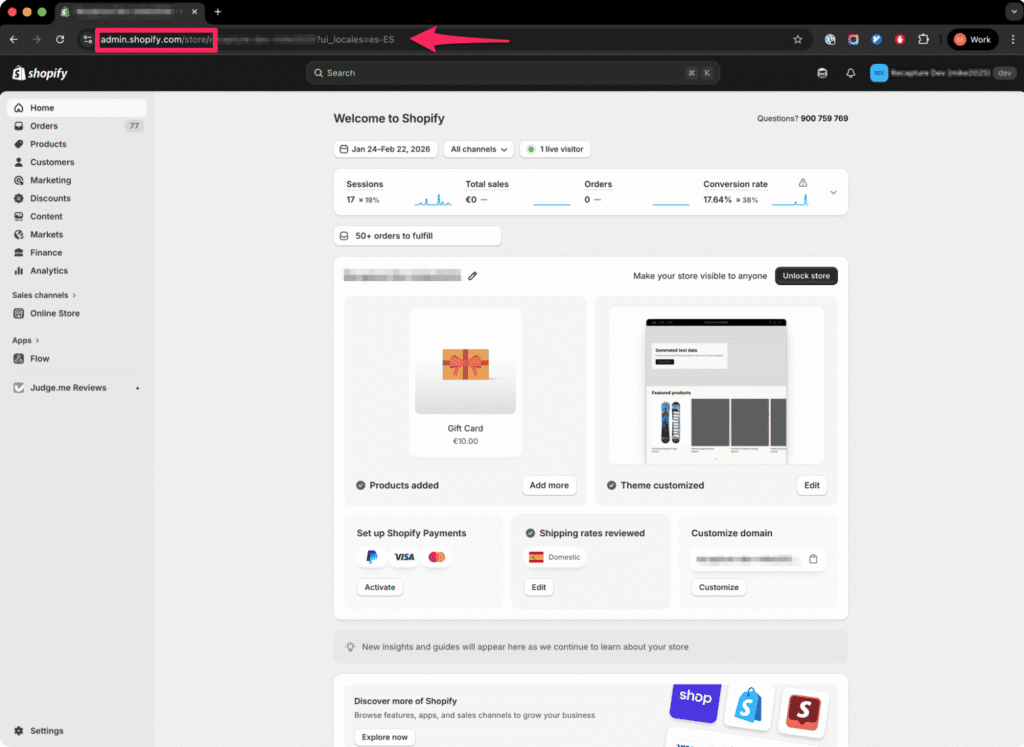
Step 1 — Log in to Shopify
Sign in to your Shopify admin dashboard.
Step 2 — Open Orders
In the left sidebar, click:
Orders
Or visit this link: https://admin.shopify.com/orders

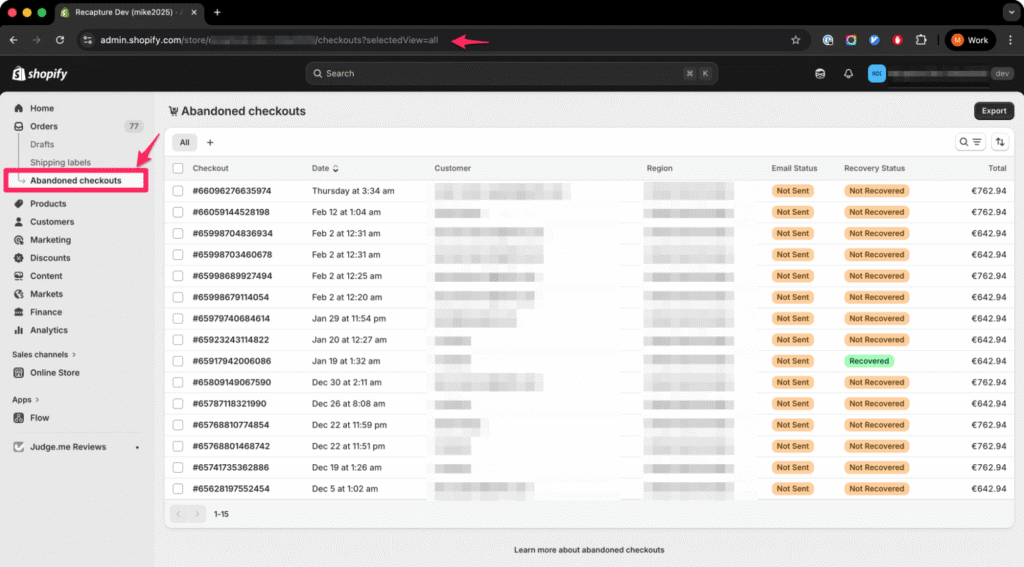
Step 3 — Click “Abandoned checkouts”
At the top of the Orders page, you will see:
Abandoned checkouts
Click it.
This page shows every checkout a customer started but did not finish.
Step 4 — Open a Checkout
Click any entry in the list.
You are now viewing the checkout record.
This page contains much more than a lost order.
What Information Shopify Shows
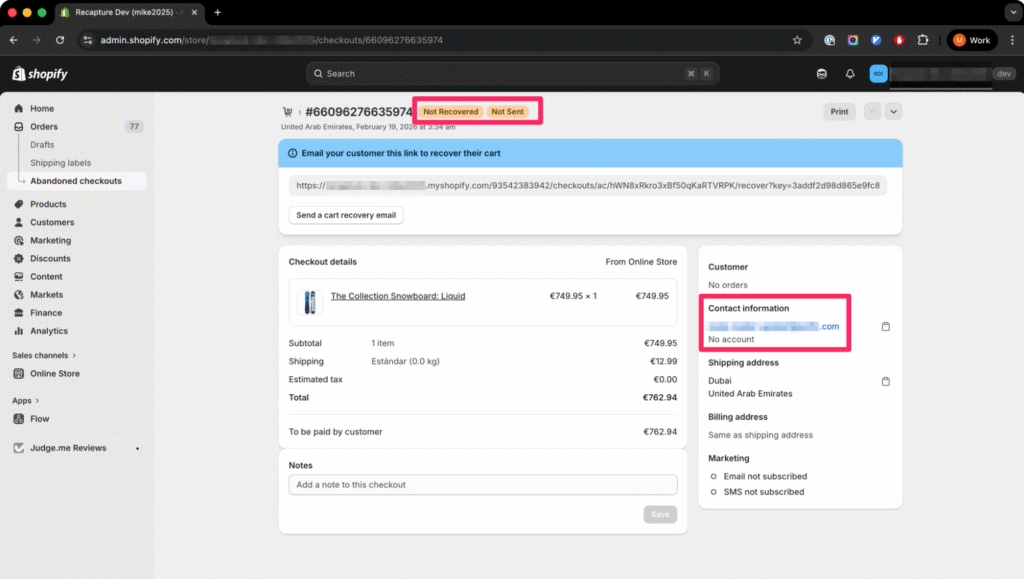
Inside each checkout you can see:
- customer email (if entered)
- items added to cart
- cart total
- location
- time the customer left
Shopify keeps these records for about three months.
What You Can Learn From an Abandoned Checkout Record
When you open an abandoned checkout in Shopify, you won’t see a full step-by-step activity history anymore.
Older Shopify documentation and tutorials sometimes mention a “timeline” showing each checkout step. Shopify no longer displays that detailed session log in most stores.
Instead, Shopify shows information focused on recovery.
From the checkout page you can still see:
• customer contact information
• items in the cart
• order value
• shipping address (if entered)
• marketing consent
• recovery email status
This is enough to understand what type of shopper this was even if you can’t see the exact moment they left.
Here’s how to interpret it:
Email present
The customer seriously considered purchasing. They entered checkout and can be recovered.
Shipping address present
They reached late checkout. Abandonment was likely caused by cost, delivery time, or hesitation.
No address, only email
Early-stage abandonment. Often comparison shopping.
Recovery email not sent
Shopify did not automatically follow up. You must trigger recovery manually or use automation.
Shopify now focuses the abandoned checkout page on helping you recover the order rather than diagnosing each individual step.
Why Some Visitors Don’t Appear Here
You may notice Google Analytics reports more abandoned carts than Shopify shows.
This is normal.
Shopify only records a checkout after the shopper enters contact information. If they leave earlier, Shopify has no customer record and cannot save the cart.
Frequently Asked Questions About Finding Abandoned Checkouts in Shopify
Yes. From the abandoned checkouts list in your Shopify admin, you can export the data as a CSV file. This export includes customer email addresses, cart contents, order values, and timestamps. Exporting is useful if you want to analyze patterns in a spreadsheet, import the data into a third-party email tool, or keep records beyond Shopify’s three-month retention window. Keep in mind that customer email addresses in this export are subject to privacy regulations, so handle the data according to your store’s privacy policy and any applicable laws like GDPR.
Shopify can send one automatic recovery email per abandoned checkout, but you need to enable it first. Go to Settings, then Checkout, and look for the abandoned checkout email option. Once enabled, Shopify sends a single reminder on a fixed delay. You cannot customize the sequence, send multiple follow-ups, or adjust timing based on cart value. Many store owners assume this is already running and are surprised to learn it was never turned on. For a full breakdown of what Shopify’s recovery email does and does not do, read our analysis of Shopify’s abandoned checkout email.
Shopify skips the recovery email in several situations. If the customer completed their purchase before the email would have sent, Shopify cancels it, which is the correct behavior. But Shopify also skips the email if a payment error triggered the abandonment, if the email address looks invalid, or if the checkout happened outside the configured timing window. This means some of your most recoverable checkouts, like payment failures where the shopper fully intended to buy, may never receive a follow-up. Third-party recovery apps like Recapture handle these edge cases and send follow-ups regardless of the abandonment cause.
Yes. The Shopify mobile app lets you view your abandoned checkouts list and open individual checkout records. The information shown is the same as the desktop admin: customer email, cart contents, order value, and recovery status. However, the mobile app does not offer the export or bulk-action features available on desktop. If you want to do anything beyond reviewing individual records, you will need to use the full Shopify admin on a computer.
Shopify only records an abandoned checkout after a shopper enters their email address or phone number during the checkout process. Visitors who browse your store, add products to their cart, and then leave without ever clicking the checkout button will not appear in this list. This is why Google Analytics may show a higher abandonment count than Shopify. Analytics tracks every visitor who adds to cart, while Shopify only tracks those who start the actual checkout flow. If you want to capture shoppers who leave before checkout, you need tools that work at the cart level rather than the checkout level.
For most stores, reviewing abandoned checkouts once a week is enough to spot patterns without getting overwhelmed by individual records. Look for trends rather than individual cases: are most abandonments happening at the shipping step or the payment step? Are cart values clustered in a certain range? Are there spikes that correlate with ad campaigns or promotions? If you have high daily traffic, a daily check can help you catch technical issues like a broken payment gateway before they cost you significant revenue. For ongoing recovery, automated tools are more effective than manual review because they follow up immediately while you focus on running your store. To understand the patterns in your data, start with why abandoned checkouts happen in Shopify.
Shopify’s abandoned checkout list offers basic sorting by date and status, recovered versus not recovered, but it does not have advanced filtering by cart value, product, or customer location. If you need to segment your abandoned checkouts by these criteria, exporting the data to a CSV and analyzing it in a spreadsheet is the most practical approach. Some third-party apps also provide dashboards that let you filter and segment abandoned checkout data directly, which saves time if you are reviewing large volumes of records regularly.
What to Do With This Data
Now that you know where to find abandoned checkouts in Shopify, the data is only useful if you act on it. Here’s where to go next depending on what you’re seeing.
If you’re wondering whether your abandonment numbers are normal: Most Shopify stores see abandonment rates between 60-80%, and a large portion of those are comparison shoppers who were never going to buy in the first session. Before you panic, read why you’re getting abandoned checkouts in Shopify — it breaks down the real causes so you can separate the noise from the actual problems.
If you noticed “Recovery email not sent” on most records: Shopify’s built-in recovery email has significant limitations — it only sends one email, on a fixed delay, and skips certain cases entirely. Understanding how Shopify’s default checkout email works will help you decide whether it’s enough for your store or whether you need something more robust.
If you want to start recovering these checkouts: Finding the data is step one. Step two is building a recovery system that actually brings shoppers back. Our guide to recovering abandoned carts in Shopify walks through a step-by-step system — from first reminder timing to the final discount nudge.
If you’re ready to pick a recovery tool: Once you understand the patterns in your data, you’ll want a tool that can act on them automatically. We tested the most popular options on pricing, features, and real recovery results — see our comparison of the best Shopify abandoned cart apps.
Or go back to the hub: → Shopify abandoned cart guide
For a complete overview of recovery across all platforms: → Abandoned Cart Recovery guide