
If you run a Shopify store, you’ve probably seen “abandoned carts” mentioned everywhere.
But here’s the key thing many people miss:
Shopify doesn’t really track abandoned carts. Shopify tracks abandoned checkouts.
That difference matters, because it changes what the numbers mean—and what you should do next.
Quick Definition
In Shopify, an abandoned checkout happens when:
- a shopper starts checkout, enters their email,
- then doesn’t complete payment.
Shopify considers that checkout “abandoned” if it stays incomplete for more than 10 minutes after the email is provided.
So when people say “abandoned cart” in Shopify, they usually mean:
“A customer got far enough into checkout that Shopify recorded it, but they didn’t buy.”
Important: Shopify Doesn’t Save the Cart
Shopify also notes something surprising:
Items in a customer’s cart at the moment they abandon checkout aren’t saved.
That’s one more reason “abandoned checkout” is a better phrase than “abandoned cart” for Shopify.
Abandoned Cart vs. Abandoned Checkout (Plain English)
Abandoned cart (generic ecommerce meaning)
A shopper adds products to their cart, then leaves.
Abandoned checkout (what Shopify actually records)
A shopper starts checkout and provides their email, then leaves before paying, on the checkout page.
So: Shopify can’t reliably measure “abandoned carts” the way many people imagine. It measures abandoned checkouts.
Why This Happens So Often (And Why It’s Usually Normal)
A high number of abandoned checkouts can feel like something is broken.
Most of the time, it’s not.
Many shoppers use checkout like a price calculator. They start checkout to see:
- shipping cost
- taxes
- delivery estimate
- the real “all-in” total
Store owners talk about this exact behavior all the time. In the Reddit thread you shared, multiple people say they start checkout mainly to see shipping/taxes and total cost.
That means an abandoned checkout is often not “rejection.” It’s “research.”
Common Real-World Examples
Example 1: “Shipping Shock”
A shopper likes your product, but shipping is higher than expected.
In the Reddit thread, several comments call out shipping cost and shipping clarity as major reasons people abandon.
What it means: Your product may be fine. Your total cost presentation might not be.
Example 2: “Comparison Shopping”
A shopper adds items on 2–3 sites, runs each checkout to see totals, and buys from only one.
Reddit commenters describe this as “window shopping” and “comparing prices,” and that it’s just normal ecommerce behavior.
What it means: A checkout is part of the decision process, not the finish line.
Example 3: “They Want a Wishlist”
Some shoppers use cart/checkout as a “save for later,” especially if wishlists are annoying or require an account.
This exact reason shows up in the thread too.
What it means: A wishlist feature (or “save for later”) can reduce noise in abandonment.
Where Shopify Stores Abandoned Checkouts
In Shopify Admin, you can review your abandoned checkouts by navigating to Orders → Abandoned checkouts. For a detailed walkthrough with screenshots, see our step-by-step guide to finding abandoned checkouts in Shopify.
This list shows every checkout that was started but not completed. Each row includes several data points that help you understand what happened:
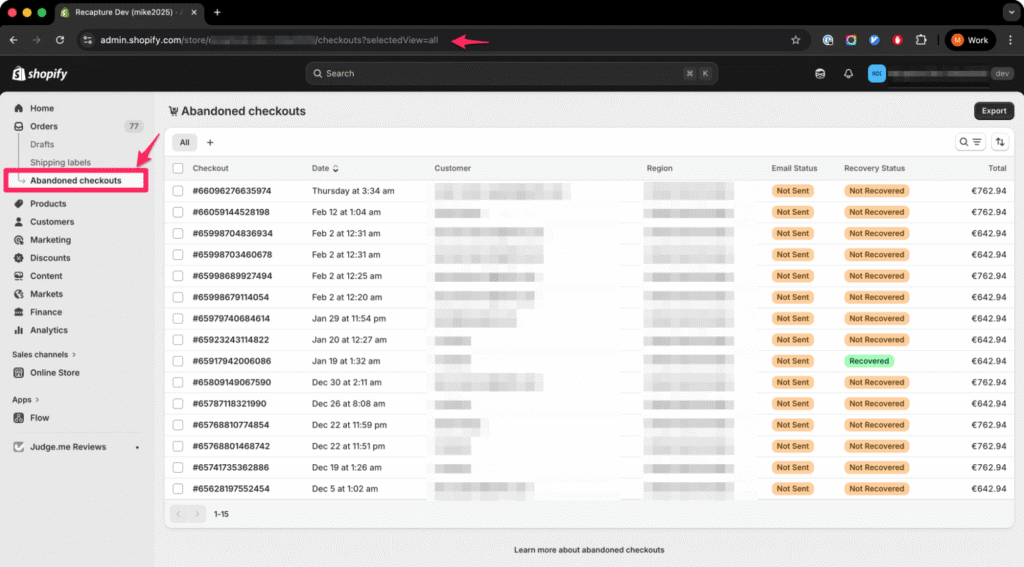
- Checkout number — Shopify assigns a sequential number to each abandoned checkout, separate from your order numbers. This makes it easy to reference specific cases when troubleshooting.
- Date — When the checkout was started (not when the shopper left). Sorting by date helps you spot spikes that correlate with promotions, site changes, or seasonal traffic.
- Customer email — The email address the shopper entered before leaving. This is the most valuable field because it gives you a direct way to reach back out. If this column is blank, the shopper left before entering their email, and Shopify won’t have recorded it as an abandoned checkout.
- Recovery status — Shopify labels each checkout as “Not recovered” or “Recovered.” A checkout moves to “Recovered” when the shopper completes payment through a recovery link. However, this status only tracks Shopify’s own recovery email — if a third-party app recovers the sale, Shopify may not update this field.
- Total value — The cart total at the time of abandonment, including products and any discounts applied. Sorting by value is useful when you want to prioritize high-value recoveries first.
When you click into an individual checkout record, Shopify shows even more detail: the specific products in the cart, quantities, any discount codes applied, the shipping address (if entered), and the payment method attempted. This granularity matters because it lets you distinguish between shoppers who got scared by shipping costs versus shoppers who hit a payment error — two very different problems with very different fixes.
How long Shopify keeps them
Shopify automatically deletes abandoned checkouts older than three months. In practice, however, data older than about 30 days is rarely actionable. By then, the shopper has either bought elsewhere or forgotten about your store entirely.
If you need to retain a specific checkout beyond the three-month window (for example, a high-value B2B order you want to follow up on manually), Shopify suggests creating a draft order from the abandoned checkout to preserve the details. Otherwise, plan on reviewing your abandoned checkout data at least monthly so you can act on patterns before the records disappear.
What Shopify Can Show You (And Why It’s Useful)
Shopify’s abandoned checkout record is valuable because it represents high-intent behavior. This shopper didn’t just browse — they chose products, started checkout, and shared their contact information. That’s much closer to a purchase than a typical site visitor, and it means the data Shopify captures is worth paying attention to.
Here’s what you can learn by reviewing your abandoned checkouts regularly:
Where shoppers drop off. If most abandonments happen right after the shipping step, that’s a strong signal that shipping costs or delivery timelines are causing friction. On the other hand, if shoppers make it all the way to payment and then leave, you may have a payment method or trust issue. The pattern tells you where to focus.
Which products get abandoned most. Some products naturally generate more abandoned checkouts than others — typically higher-priced items where the purchase decision takes longer. But if you notice a specific product with an unusually high abandonment rate compared to similar items, it may have a pricing, description, or image problem worth investigating.
What time of day (and day of week) abandonments spike. Sorting your checkouts by date can reveal patterns tied to your traffic sources. Paid ad traffic often converts differently than organic traffic, and if your abandoned checkouts spike during certain campaigns, that’s a signal to revisit the ad-to-checkout experience.
How much revenue is sitting uncollected. Adding up the total values of your abandoned checkouts gives you a ceiling estimate of recoverable revenue. Not all of it is recoverable — some shoppers were never going to buy — but even recovering 5-10% of that number can meaningfully impact your monthly revenue.
Payment issues can also create abandoned checkouts
Not every abandoned checkout is a shopper walking away by choice. Shopify notes that some abandoned checkouts result from payment processing issues — a declined card, failed 3-D Secure authentication, or a temporary gateway error. These are technically “abandoned” in Shopify’s data, but the shopper may have fully intended to pay.
If you see repeated payment-related abandonments, the problem isn’t marketing — it’s infrastructure. Check your payment gateway settings, make sure 3-D Secure is configured correctly, and consider whether offering additional payment methods (like Shop Pay or PayPal) would reduce friction at that last step.
“If Shopify Doesn’t Save the Cart, How Do Recovery Emails Work?”
Shopify’s recovery emails work by sending the customer a link back to their specific checkout session. Because Shopify captured their email address and the checkout details at the time of abandonment, it can reconstruct the cart and let the shopper pick up where they left off.
There’s a catch, though: Shopify only sends one recovery email per abandoned checkout, and it sends it on a fixed delay. You can’t customize the sequence, adjust the timing based on cart value, or send follow-up reminders if the first email goes unopened. For many stores, that single email recovers some sales — but leaves a significant amount on the table. Our breakdown of what Shopify’s abandoned checkout email actually sends (and why it often falls short) covers the specifics.
Shopify also won’t send a recovery email in certain cases — for instance, if the shopper completed checkout before the email would have sent, or if a payment error triggered the abandonment. These edge cases mean your “sent” count won’t always match your abandoned checkout count, and that’s expected.
Third-party recovery apps like Recapture extend what’s possible by sending multi-step email sequences, adding SMS as a channel, and personalizing timing based on cart value and customer behavior. The core mechanism is the same (a link back to the checkout), but the strategy around when and how to send it makes a substantial difference in recovery rates.
Frequently Asked Questions About Abandoned Carts in Shopify
An abandoned cart happens when a shopper adds items to their cart and then leaves your store without starting checkout. Shopify does not track these because it has no way to identify the shopper. An abandoned checkout happens when a shopper starts checkout, enters their email address, and then leaves without completing payment. This is what Shopify actually records and reports in your admin dashboard. The distinction matters because Shopify can only send recovery emails for abandoned checkouts, not abandoned carts.
Most Shopify stores see abandonment rates between 60% and 80%. This is consistent with the broader ecommerce industry average, which hovers around 70% according to the Baymard Institute. A high number does not necessarily mean something is wrong with your store. Many of those abandonments are shoppers using checkout as a price calculator, comparing options across multiple stores, or saving items for later. The number that actually matters is your recovery rate, not your abandonment rate.
Shopify does not send you, the store owner, a notification each time a checkout is abandoned. You need to check your abandoned checkout list manually by going to Orders and then Abandoned checkouts in your Shopify admin. Shopify can send a recovery email to the customer automatically, but that is a separate feature you need to enable. For details on how that works and its limitations, see what Shopify’s abandoned checkout email actually sends.
Yes. When you open an individual abandoned checkout record in your Shopify admin, you can see the specific products the shopper had in their cart, including quantities and any discount codes they applied. You can also see the shipping address if they entered one, the cart total, and the customer’s email address. This level of detail helps you understand whether the shopper left because of pricing, shipping costs, or something else. For a walkthrough of where to find this data, see our guide to finding abandoned checkouts in Shopify.
Shopify automatically deletes abandoned checkout records after three months. In practice, data older than about 30 days is rarely useful because the shopper has almost certainly bought elsewhere or forgotten about your store by then. If you need to preserve a specific checkout record, for example a high-value B2B order, you can create a draft order from the abandoned checkout before it expires. Plan on reviewing your abandoned checkout data at least monthly so you can spot patterns before the records disappear.
If your abandoned checkout list is empty, it usually means one of two things. Either your store is not getting enough traffic for shoppers to reach checkout, or shoppers are leaving before they enter their email address. Shopify only creates an abandoned checkout record after a customer provides contact information. Visitors who browse products, add items to their cart, and then leave without ever clicking Checkout will not appear in this list. If you are getting traffic but seeing no abandoned checkouts, the issue is likely earlier in your funnel, not at checkout itself.
No. A high abandonment rate is normal across all ecommerce platforms, not just Shopify. Many abandoned checkouts represent healthy shopping behavior like price comparison, checking shipping costs, or saving items for a later purchase. The real concern is not the total number of abandoned checkouts but whether you are recovering enough of them. Even a small improvement in recovery rate can have a meaningful impact on monthly revenue. To understand the specific causes behind your numbers, read why you’re getting abandoned checkouts in Shopify.
What To Do Next
If you landed here because you saw a scary number of “abandoned carts” in your Shopify dashboard, the most important first step is understanding what you’re actually looking at. Now that you know Shopify tracks abandoned checkouts (not carts), and that a large percentage of them represent normal shopping behavior, you can stop guessing and start looking at patterns.
Here’s where to go from here, depending on what you need:
Find your data first. Before you can spot patterns, you need to know where Shopify keeps this information and how to read it. Our guide to finding abandoned checkouts in Shopify walks through the Shopify Admin step by step.
Understand the causes. Once you can see the data, the next question is why shoppers are leaving. Shipping shock, comparison shopping, and payment errors all look the same in the dashboard — but they require very different fixes. Read: Why you’re getting abandoned checkouts in Shopify (real causes explained).
Learn what Shopify emails by default. Shopify includes a built-in recovery email, but it has significant limitations. Before you invest in a third-party tool, it’s worth understanding what Shopify’s abandoned checkout email sends and why it often fails.
Set up a real recovery system. A single recovery email captures some lost revenue, but a multi-step sequence with proper timing recovers far more. Our Shopify abandoned cart recovery guide lays out a step-by-step system you can implement today.
Compare recovery tools. If you’re ready to go beyond Shopify’s built-in option, we tested the 10 most popular recovery apps on pricing, features, and real results. See our comparison of the best Shopify abandoned cart apps.
Or go back to the hub: → Shopify abandoned cart guide