
Shopify abandoned cart recovery is the process of contacting customers who started checkout but did not complete payment. The most effective recovery systems use timed reminders, reassurance, and automation to bring buyers back and recover lost revenue.
Most Shopify stores lose 60–80% of checkout attempts.
That sounds alarming. But here’s what matters:
Those customers are not gone. They are still deciding.
We’ll show you how to fix this problem in under 10 minutes.
This covers Shopify-specific recovery. For a broader overview, see Abandoned Cart Recovery. Or read why you’re getting abandoned checkouts, first.
Understanding Shopify Abandoned Carts
If you’re new to recovery automation, it helps to first understand how Shopify tracks abandoned carts and checkouts.
Shopify records when a customer begins checkout but leaves before completing payment. These sessions appear in the Abandoned Checkouts report inside your Shopify admin.
You can learn exactly how this works in our detailed guide:
→ Our Shopify abandoned cart overview
This guide explains:
• how Shopify defines abandoned checkouts
• where to find them in your dashboard
• what normal abandonment rates look like
• why customers leave before completing purchase
Understanding these basics makes it easier to design an effective recovery system.
Step 1: Understand What Shopify Tracks
In Shopify, abandoned carts are stored as abandoned checkouts.
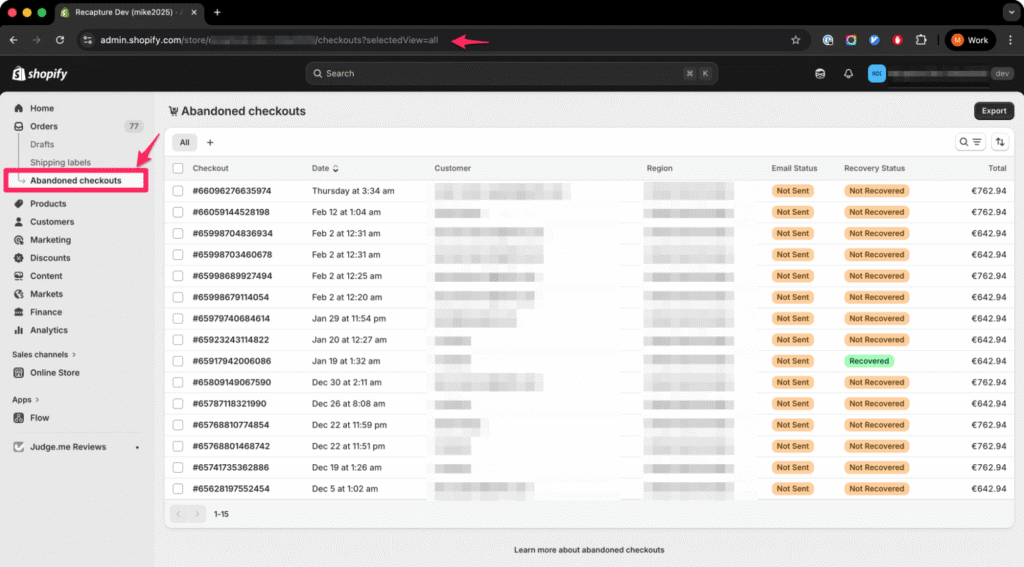
To find them:
- Go to Shopify Admin
- Click Orders
- Click Abandoned checkouts
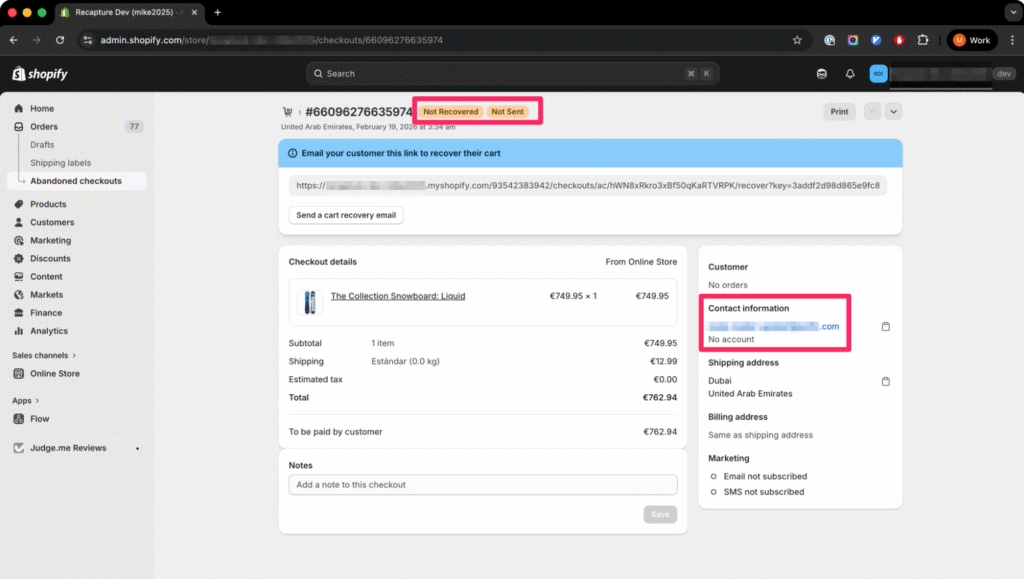
Shopify records:
- Customer email (if entered)
- Cart items
- Cart total
- Date and time
- Recovery status
If someone only adds to cart, it does not count as an abandoned checkout.
The customer must begin the checkout process on your store to do that.
If you’re unsure what counts as abandonment, read:
👉 What Is an Abandoned Cart in Shopify?
👉 Where to find abandoned checkouts in Shopify
Step 2: Send the First Reminder Quickly
Timing matters more than discounts.
Best practice:
| Time After Abandonment | Purpose |
|---|---|
| 30–60 minutes | Catch distraction |
Many customers leave because they were interrupted.
Your first message should:
- Be short
- Include product image
- Include direct checkout link
- Avoid offering a discount (that comes later, if your margins support it)
This is a reminder, not a sales pitch.
Step 3: Reinforce Trust (6–12 Hours Later)
If a customer reaches checkout but doesn’t pay, hesitation often happens at the payment step.
Common reasons:
- Trust uncertainty
- Shipping cost surprise
- Return policy confusion
Your second email should:
- Reinforce your return policy
- Highlight reviews (social proof is huge here!)
- Clarify delivery times
- Answer common objections (link to an FAQ page, for example)
This builds confidence.
Step 4: Optional Incentive (24 Hours)
Never lead with a discount–unless that’s what your brand is all about (e.g. Old Navy).
If the first two messages do not convert, you may test:
- Small percentage discount
- Free shipping
- Limited-time incentive
Only offer incentives if your profit margins allow it. Know your numbers!
Step 5: Final Reminder (48 Hours)
The final email creates urgency.
Examples:
- “Your cart is still waiting”
- “Still thinking it over?”
- “Your items may sell out”
Keep it calm and helpful.
Why Shopify’s Built-In Recovery Is Limited
Shopify includes one automated abandoned checkout email.
It:
- Sends once
- Uses fixed timing
- Treats all carts the same
- Has limited segmentation
If you want a deeper breakdown of Shopify’s default email, read:
👉 Shopify Abandoned Checkout Email: What It Sends (And Why It Fails)
Shopify’s system works for small or new stores, up to a point.
It does not maximize recovery for growing or mid-size stores.
Read more:
What a Complete Recovery System Includes
A strong Shopify abandoned cart recovery system uses:
- 3–4 message sequence
- Smart timing logic
- Cart value segmentation
- Performance tracking
- Revenue attribution
Automation tools allow this without manual work.
If you want to see how automation improves recovery results:
👉 See How Recapture’s Recovery Automation Works
What Is a Good Abandoned Cart Recovery Rate?
Typical recovery ranges:
- 3–8% = Basic (single email)
- 10–15% = Optimized multi-step email
- 15–20% = Advanced automation
If your recovery rate is under 5%, your system likely needs improvement.
For deeper benchmarks and examples, read:
👉 What Is a Good Shopify Abandoned Cart Recovery Rate?
Here’s a handy infographic to help summarize everything we covered about abandoned cart recovery on Shopify:

Not on Shopify?
This guide is focused on Shopify, but Recapture isn’t a Shopify-only app. If you’re running on a different platform, we have native integrations for the other major ecommerce systems:
- WooCommerce merchants — see our WooCommerce abandoned cart solution for plugin install, setup, and recovery sequence templates
- Magento 2 stores — install our Magento abandoned cart extension for native Magento cart recovery
- BigCommerce stores — Recapture supports BigCommerce abandoned cart recovery with the same multi-step sequences
- Easy Digital Downloads — for digital-product merchants, see EDD abandoned cart recovery
Same product, same dashboard, same pricing — just different platform integrations.
Frequently Asked Questions About Shopify Abandoned Cart Recovery
Shopify abandoned cart recovery is the process of contacting customers who started checkout but did not complete payment. In Shopify, these are stored as “abandoned checkouts.”
Recovery typically involves sending reminder emails (and sometimes SMS) that:
* Include a direct checkout link
* Show the products left behind
* Reinforce trust and delivery details
* Address common objections
The goal is not to convince new visitors. It is to bring back buyers who already showed strong purchase intent.
The first email should be sent within 30 to 60 minutes of abandonment.
This works because:
– Many customers were distracted
– The product is still fresh in their mind
– Purchase intent is still high
A typical recovery timeline looks like this:
1) 30–60 minutes: Reminder
2) 6–12 hours: Reassurance
3) 24 hours: Optional incentive
4) 48 hours: Final reminder
Waiting too long lowers recovery rates.
Most optimized Shopify stores send 3 to 4 emails over a 48-hour period. Sending only one email often recovers less than 8%.
A multi-step sequence allows you to:
– Catch missed inboxes
– Reinforce trust
– Address objections
– Introduce urgency gradually
More than four emails can feel aggressive and may hurt deliverability.
Typical recovery rate ranges:
* 3–8%: Basic single email
* 10–15%: Optimized email sequence
* 15–20%: Advanced automation (email + SMS or segmentation)
Recovery rate depends on:
– Traffic quality (paid, organic, bot)
– Product price (for your vertical)
– Trust signals (reviews, brand, reputation)
– Checkout experience
– Payment options
If you are below 5%, your recovery system likely needs improvement.
Shopify’s highly limited system includes one built-in abandoned checkout email by default.
This system:
* Sends one reminder
* Uses fixed timing
* Has limited customization
* Does not segment by cart value
To implement a full recovery system with multiple emails and smart timing, you need automation beyond Shopify’s default settings.
More FAQs on Shopify Abandoned Cart Recovery
Should I offer a discount in my abandoned cart emails?
You should not lead with a discount, unless this is core to your brand (e.g. OldNavy).
Most abandonment happens due to distraction or hesitation — not price objection.
Offer a discount only if:
- Initial reminders did not convert
- Your margins allow it
- You are testing incentive impact
Overusing discounts can train customers to abandon intentionally.
Why do customers abandon checkout in Shopify?
Most checkout abandonment is normal.
Common reasons include:
- Checking shipping costs
- Comparing total price
- Payment hesitation
- Mobile friction
- Coupon searching
- Distraction
Abandonment does not automatically mean something is broken.
However, if you see many checkouts but zero orders, investigate payment settings and checkout configuration.
Can abandoned cart recovery increase revenue significantly?
Yes, this is the single greatest lever you have to increase your revenue with the lowest amount of effort.
Because abandoned checkouts represent high purchase intent, even small recovery improvements can generate meaningful revenue.
For example:
If 1,000 checkouts are abandoned monthly and your average order value is $80, meaning you have $80,000 in lost abandoned cart revenue, then:
- 5% abandoned cart recovery = $4,000 revenue increase
- 15% recovery = $12,000 recovered
The difference comes from system optimization, not traffic volume. The typical store on Recapture recovers approximately 10% of their sales volume in abandoned cart recovery emails, based on our historical data from 2016-present.
What is the difference between abandoned cart and abandoned checkout in Shopify?
In Shopify:
- “Cart” = items added but checkout not started
- “Abandoned checkout” = checkout started but payment not completed
Recovery emails only trigger when checkout is started and an email address is entered.
Ready to get started?
You can have Recapture up and running in 5 minutes.
Free, 14-day, zero-risk, no-credit-card-required trial.
Simplify your abandoned cart recovery, profitably, right now!